
How to build a sales funnel in 7 steps, with an example
In short
A sales funnel is the series of pages that takes a visitor to a purchase: an opt-in or sales page, a checkout with a small checkbox add-on (order bump), a one-click extra offer (upsell), a thank-you page, then emails. To build one, pick an offer and an audience, write each page, connect payments, then test and measure. Shoplit.io, Systeme.io, ClickFunnels and LearnyBox gather these pages; Shoplit.io can also create the product and the funnel with AI.
What is a sales funnel?
A sales funnel is a path made of several pages, each with a single job: leave an email, read the offer, pay, accept an extra offer. It’s called a funnel because many visitors come in at the top and only some of them reach the purchase.
What sets it apart from a sales page is scope. A sales page presents one offer on one page. A funnel organizes what happens before it (capturing the email) and after it (checkout, extra offers, the thank-you page, the emails). The sales page is one step of the funnel, often the most important one.
The steps of a sales funnel, from opt-in to thank-you page
The opt-in page
It offers something free (a checklist, three recipes, a mini guide), called a lead magnet, in exchange for an email address. The page needs a headline, the promise of the freebie and a short form: nothing else should distract. This page is optional: an audience that already knows you, on TikTok or Instagram for example, can go straight to the sales page.
The sales page
This is the page that convinces: promise, contents, proof, price, guarantee, then a repeated buy button that always leads to checkout. A preview and a few real reviews help people decide. For a block-by-block breakdown, see what a sales page should include.
Checkout and the order bump
The checkout page should stay short: order summary, total price, as few fields as possible. It can include an order bump, a checkbox right above the payment button that adds a small extra product before paying. In the UK and the EU, the final button must make clear that ordering means paying, with the words “order with obligation to pay” or an equally clear phrase (EU Directive 2011/83, Article 8(2); in the UK, Consumer Contracts Regulations 2013, regulation 14).
The upsell and the downsell
The upsell is an offer shown right after checkout, when the buyer has just said yes. With a tool that saves the card at checkout, they accept it in one click, without typing their details again. The downsell only appears to those who decline the upsell: a shorter or cheaper version of the same idea. One useful offer beats three filler ones.
The thank-you page
It confirms the purchase and says exactly how to get the product: download link, delivery email, timing. It can also suggest one simple next step, such as following your account. The buyer has just paid: this is the page that reassures them about the purchase.
The emails
After a sign-up: delivery of the freebie, two or three useful messages, then the offer. After a purchase: delivery, then a review request. For a visitor who leaves checkout without paying: an abandoned cart reminder, provided they agreed to receive your emails.
How many steps do you need?
In pages, three are enough to sell (sales page, checkout, thank-you page); a complete funnel has five to seven. Guides that talk about four stages or more often describe the buyer’s state of mind (awareness, interest, decision, action), not the pages to build.
Do you need an email list? What the consent rules say
No. A funnel can sell directly, from the sales page to checkout. A list is for visitors who aren’t ready to buy today: you stay in touch and show them the offer later.
If you collect emails to send offers, the rules depend on where your subscribers live. In the US, the FTC’s CAN-SPAM compliance guide lists what every marketing email must do: no misleading header or subject line, identify the message as an ad, say where you’re located, explain how to opt out and honor opt-out requests within 10 business days. The law makes no exception for business-to-business email, and its listed requirements focus on opting out rather than on prior consent.
The UK is stricter. The ICO says you must not send marketing emails to individuals without specific consent, and sole traders count as individuals. The “soft opt-in” exception covers existing customers who bought, or negotiated to buy, a similar product from you, if you offered a simple way to opt out when you collected their details and in every message. It is tied to a purchase, so be careful with people who only downloaded a free lead magnet: ask for consent with a box they check themselves. The ICO notes this guidance is under review. In the EU, consent rules are set by each country under a common directive; in France, the CNIL requires prior consent from individuals and rules out pre-checked boxes. For a specific case, ask a lawyer.
In Shoplit.io, someone who downloads a free product is only subscribed to your emails if they check the box provided. Buyers, on the other hand, are subscribed by default: to let them say no at checkout, turn on the consent checkbox in Settings, on the Email Marketing tab. Abandoned cart reminders only go to visitors who checked that box themselves (set to “Unchecked”), and every campaign ends with an unsubscribe link.
How to build a sales funnel in 7 steps
- Define the offer and the audience. “A recipe ebook” is vague; “a month of Sunday meal prep for working parents” fits in one sentence, which will become the headline of your sales page.
- Plan the extra offers. A small, obvious order bump (printable shopping lists), an upsell that extends the purchase (four more weeks of meals), and maybe a lighter downsell. Each offer serves the same person as the main product.
- Create the freebie and the opt-in page, if you want one. The freebie gives a quick win. The form asks for the email, maybe the first name, with an unchecked consent box.
- Write the sales page. Follow the order of the blocks above (promise, contents, proof, price, guarantee), add an excerpt of the product and an FAQ. An AI assistant writes a first draft fast; edit it to remove any promise the product doesn’t keep.
- Connect payments and delivery. You need a payment processor such as Stripe or PayPal, and automatic delivery of the file. For an ebook, our guide to creating an ebook with AI and selling it has pointers on the withdrawal waiver for EU buyers, registering a business, and sales tax or VAT.
- Write the emails. At minimum: delivery of the freebie, two or three useful messages that lead to the offer, the delivery email after purchase. Then the abandoned cart reminder, for visitors who agreed to your emails.
- Test, launch, measure. Make a test purchase on your phone (in your payment processor’s test mode) and check every email. Once live, track one number per step: sign-ups over opt-in page visitors, buyers over sales page visitors, the share of buyers who take the order bump, then the upsell. Fix the weakest step first, one change at a time.
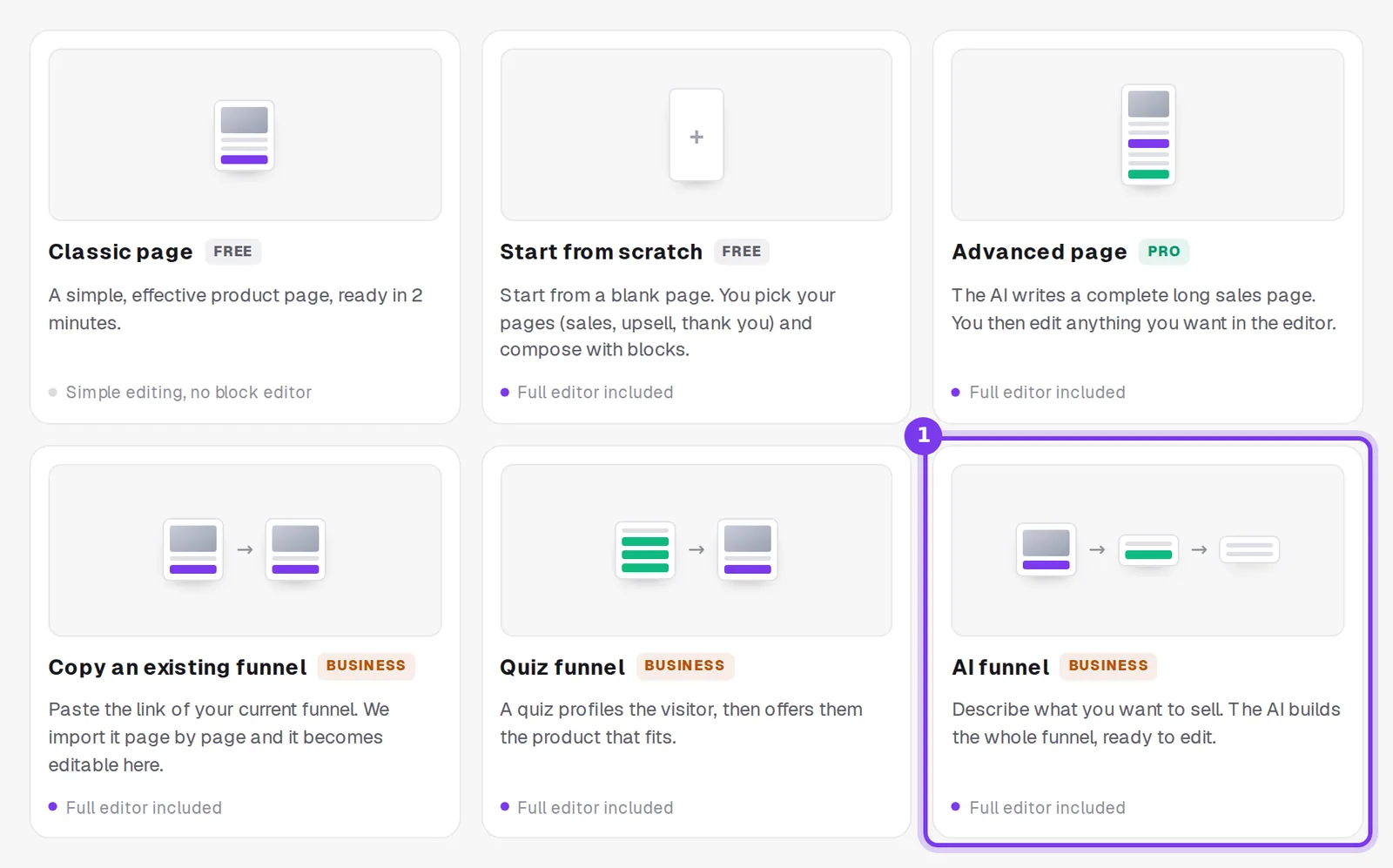
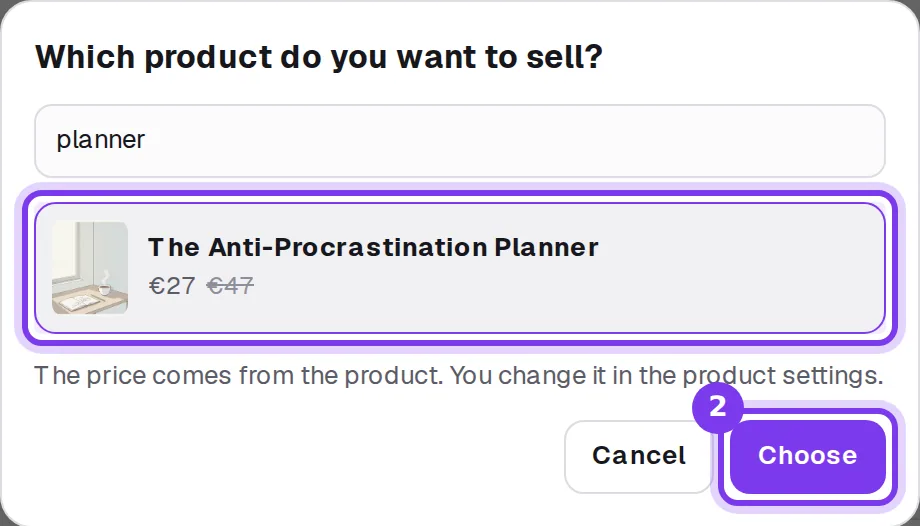
In Shoplit.io, you build a funnel by hand in a block editor, or all at once with the AI funnel. You describe your product, or use the My products button to pick an ebook or a video course you already created. The AI asks two to four questions, then shows the funnel plan: sales page or opt-in page, checkout with an order bump, upsell, downsell, thank-you page. You ask for changes in one sentence, for example removing the downsell, then start the build; the funnel opens on its overview, and everything stays editable in the editor. Payments go through your own Stripe account.
The Free plan lets you build 3 funnels by hand, with a sales page, checkout and thank-you page. The Pro plan, at €29/month, adds the order bump, email capture forms, email marketing and automations, including abandoned cart reminders. The Business plan, at €59/month, adds the AI funnel and one-click upsells and downsells.
Which tools can you use to build a sales funnel?
Systeme.io and ClickFunnels are the funnel builders that come up most in guides on the topic, and LearnyBox comes up often in French ones. All three handle funnels with checkout and emails; they differ mostly on entry price and the role of AI.
| Criterion | Shoplit.io | Systeme.io | ClickFunnels | LearnyBox |
|---|---|---|---|---|
| Funnels with one-click upsell | Yes Business | Yes | Yes | Yes |
| Built-in checkout | Yes | Yes | Yes | Yes |
| Email marketing | Yes Pro, Business | Yes | Yes | Yes |
| Writes the sales page with AI | Yes | Partly AI Chat on Unlimited plan, or prompt for an external AI | Yes | No |
| Free plan | Free + 10% per sale | Free | No | Free |
| First paid plan | €29/month | €17/month | $97/month | €39/month excl. tax |
- Yes
- Partly
- No
Platform commission, excluding payment processing fees. Prices checked on October 20, 2026 on the official websites. Sources: Systeme.io (1, 2, 3, 4), ClickFunnels (1, 2, 3, 4, 5), LearnyBox (1, 2, 3, 4)
Systeme.io’s free plan is unusually generous: no commission, 3 funnels, a one-click upsell, an order bump, one automation rule and email sending to 2,000 contacts. Its terms cap the lifetime revenue you can make on that plan, and paid plans start at €17/month (the same amount in dollars on its English pricing page). Its AI Chat, which writes page content for funnel steps, is limited to the Unlimited plan for now. Its site is available in English and French.
ClickFunnels is a funnel specialist: one-click upsells, multiple one-time offers, order bumps, A/B tests on funnels and emails, several payment gateways and an AI assistant that designs pages. It has no free plan, only a 14-day trial, and its first plan costs $97/month. Our Shoplit.io vs ClickFunnels comparison goes into the details.
LearnyBox is a French tool: support based in France even on the free plan, a compliant invoice generated for every sale, and VAT handling built for France and the EU. Its free plan is limited to one funnel of 10 pages, with a cap on sales. Paid plans start at €39/month excl. tax on its French pricing page; its English page lists separate prices in dollars. No AI page writing among the features listed on its site as of October 20, 2026.
Shoplit.io starts one step earlier: it also creates the product, the ebook, with AI, then its sales page and the funnel that sells it, in English or French, and takes payments through your own Stripe account. There’s nothing to copy over from a writing tool.
Systeme.io suits a free start with funnels and email; ClickFunnels, advanced funnels with multiple one-time offers and several payment gateways; LearnyBox, courses with invoicing built for France and the EU. If you want AI to create the product, its sales page and the funnel, choose Shoplit.io.
A complete example: a funnel for a recipe ebook
Take a meal prep ebook, “A Month of Sunday Meal Prep”, sold to parents who follow a cooking account on Instagram.
| Step | What the visitor sees | What it’s for |
|---|---|---|
| Opt-in page | “5 recipes you can prep in one hour” for an email, unchecked box to receive offers | build the list |
| Emails after sign-up | the freebie, two planning tips, then the ebook | build trust |
| Sales page | who it’s for, what’s inside, a two-page excerpt, an FAQ, the guarantee | sell the ebook |
| Checkout and order bump | a “printable shopping lists” checkbox right above the button | grow the order |
| Upsell | four more weeks of meals, added in one click | offer what comes next |
| Downsell | one week of holiday meals, cheaper | recover a no |
| Thank-you page | the download link, an invitation to follow the account | reassure, stay in touch |
| Emails after purchase | delivery, then a review request a week later | keep the customer |
You don’t have to build everything at once. Start with the sales page, checkout and thank-you page, then add the order bump and the upsell after your first sales: by then, you’ll know what your buyers ask for. In Shoplit.io, on the Business plan, the AI funnel builds the pages of this funnel from the ebook; if an offer is missing, such as the shopping lists, it suggests a product idea that you then generate from the funnel.
Frequently asked questions
Can I build a sales funnel for free?
Yes. On Shoplit.io, the Free plan lets you build 3 funnels by hand, with a sales page, checkout and thank-you page and no subscription (a 10% commission applies per sale); the Business plan, at €59/month, adds the AI funnel and one-click upsells. Systeme.io’s free plan, with no time limit, includes 3 funnels and email sending, with a cap on lifetime revenue; LearnyBox offers one free funnel, with a cap on sales. ClickFunnels has no free plan. In every case, your payment processor’s fees come on top.
What is the difference between a sales funnel and a sales page?
A sales page presents one offer on a single page. A sales funnel is the whole path around it: the opt-in page before, then checkout, extra offers, the thank-you page and the emails. The sales page is one step of the funnel, often the most important one.
Do I need an email list to sell with a funnel?
No. A funnel can sell directly, from the sales page to checkout. A list keeps you in touch with visitors who aren’t ready to buy yet. If you build one, follow the rules where your subscribers live: in the US, CAN-SPAM requires a clear way to opt out of every marketing email; in the UK, the ICO says you need specific consent before emailing individuals, with an exception for existing customers.
What is an upsell in a sales funnel?
It’s an extra offer shown right after checkout, when the buyer has just said yes. With a tool that saves the card at checkout, they accept it in one click, without typing their details again. If they decline, a downsell can offer a lighter or cheaper version. An order bump, by contrast, is a checkbox on the checkout page, before the purchase.
How many steps does a sales funnel need?
Three pages are enough to sell: a sales page, a checkout and a thank-you page. A complete funnel usually has five to seven, adding an opt-in page, an upsell and a downsell; the order bump sits on the checkout page and the emails come on top. Guides that talk about four stages describe the buyer’s state of mind (awareness, interest, decision, action), not the pages you build.
Step-by-step guides in the help center
Read also
- Sales page builders compared: which one to choose?Systeme.io, ClickFunnels, Leadpages, Gumroad or Shoplit.io: which sales page builder to pick, what a sales page must include and the legal rules to follow.
- Systeme.io alternatives: Kajabi, Podia, LearnyBox comparedLooking for a Systeme.io alternative? Shoplit.io, LearnyBox, Podia and Kajabi compared on AI, funnels, courses, email and pricing, and when to pick each.