
How to create an ebook with AI and sell it, step by step
In short
To create an ebook with AI and sell it, pick a narrow topic, have AI draft the outline and the text, then edit it, check the facts and add your experience. Design the layout and cover, set a price, publish a sales page connected to online checkout, and share the link with your audience. Shoplit.io brings these steps together: its AI writes the ebook, then its sales page when you ask, and checkout runs through Stripe.
What you need before you start
You don’t need to be a writer or a designer: AI drafts and lays out much of the ebook. You do need:
- A topic you know, or can check against reliable sources. AI writes fast, but it can be confidently wrong.
- A specific reader: “first-time puppy owners” rather than “animal lovers”. The sharper the target, the more useful the generated text.
- A way to get paid: a selling platform, or a sales page connected to a payment provider such as Stripe.
- Time to edit. That step is what separates an ebook people recommend from one they regret buying.
If you intend to sell regularly, also think about the paperwork (business registration, sales tax or VAT): the FAQ at the bottom of the page has pointers.
How to create and sell an ebook with AI: the 8 steps
These eight steps work with any tool. AI speeds up the writing; choosing the topic, editing and selling are still your job.
- Pick a topic that sells. A good topic solves one specific problem for one specific reader: “house-train your puppy in 30 days”, “prep a week of lunches in one hour on Sunday”, “land your first freelance clients”. Check that people already look for the answer: questions that keep coming up under your videos, in Reddit threads or Facebook groups, comparable ebooks already on sale. A narrow topic boils down to one clear promise, which becomes your title and your hook.
- Generate the outline, then the content. Give the AI the topic, the reader, the tone and the promise, and ask for a detailed outline first. Fix the outline before any drafting: add the missing chapter, cut the one that repeats another. Then have it write chapter by chapter with an assistant such as ChatGPT, or all at once with an ebook generator.
- Edit, fact-check, make it yours. Read everything, out loud if you can. Check every number and every piece of health, legal or money advice against a reliable source. Add what AI cannot invent: your examples, your mistakes, your photos, your worksheets. That is where the value is, and those human choices are also what can make the ebook eligible for copyright (see the FAQ). Cut the repetition: a short, dense ebook beats a padded one.
- Design the layout and the cover. The cover is the first thing buyers see, often as a thumbnail on a phone, so it needs a title you can read at a glance and a simple image. Inside: clear headings, short paragraphs, lists and a few illustrations. A design tool such as Canva works if you start from a blank page for an ebook you sell (see below). A full ebook generator gives you a laid-out PDF with its cover, which you then adjust.
- Set the price. Look at what comparable ebooks on your topic cost, then position yours according to what it adds: a complete method, fill-in templates, concrete examples. You can also give it away in exchange for an email address, to build a list of readers you can sell to later. Benchmarks by ebook type are further down.
- Build the sales page. It answers the buyer’s questions in order: who the ebook is for, what problem it solves, what’s inside, what it costs, how they receive it. Add a preview of a few pages and a short FAQ. AI drafts a first version quickly; edit it to remove any promise the ebook doesn’t keep. To add an extra offer after the purchase, see how to build a sales funnel.
- Take payment and deliver. You need secure checkout and automatic delivery: the buyer pays, then gets the ebook by email or on a download page. If you sell to consumers in the European Union, add a checkbox at checkout where buyers agree to get the ebook right away and give up their right of withdrawal: without it, they keep 14 days to cancel (Your Europe). The seller must also confirm that consent to the buyer after the purchase, on a durable medium such as the delivery email (EU Directive 2011/83, Article 16). UK rules are similar (GOV.UK).
- Get the word out. A sales page with no visitors sells nothing. Put the link in your TikTok or Instagram bio, post useful excerpts (a tip, a page, a before-and-after), email your list, answer your audience’s questions with a passage from the book. On your own page, every buyer leaves you their email, so you can offer them your next product. If you want to sell without showing your face, read how to start a faceless digital business.
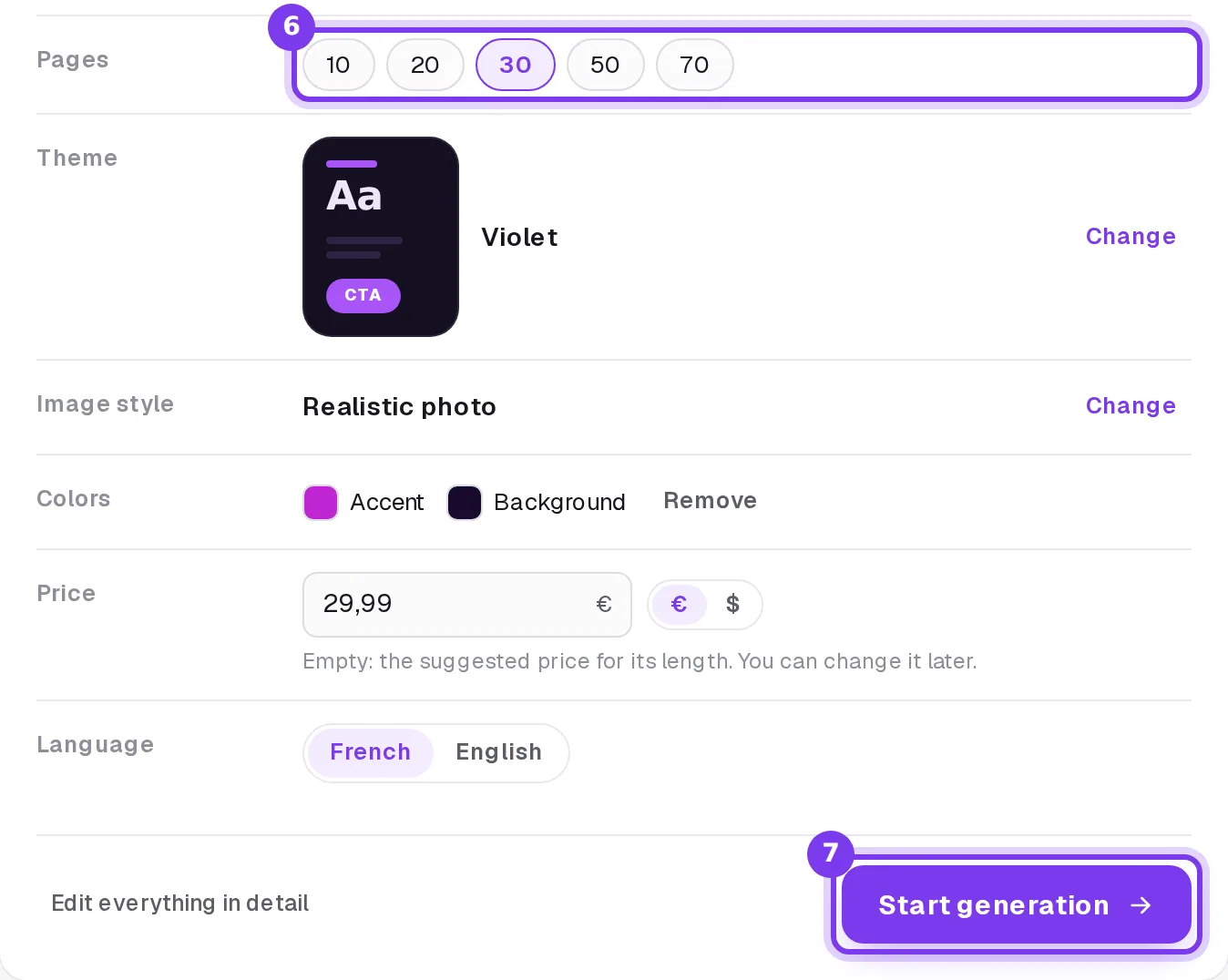
In Shoplit.io, steps 2 to 7 happen in one place. You describe the ebook in one sentence, the AI assistant asks a few questions, then shows a recap for you to approve. It then writes and illustrates the ebook in a few minutes. Say in your message that you also want a sales page (for example “…and a classic sales page to sell it”): the ebook and its page are then generated one after the other, in a single click (help center guide). Payments go through your own Stripe account: the money goes straight to you, and the buyer gets the file automatically. You turn on the withdrawal waiver checkbox in Settings, on the Legal pages tab; then send each buyer the durable-medium confirmation described in step 7.
This recap covers the page count, theme, image style, colors, price and language, which you can still change.
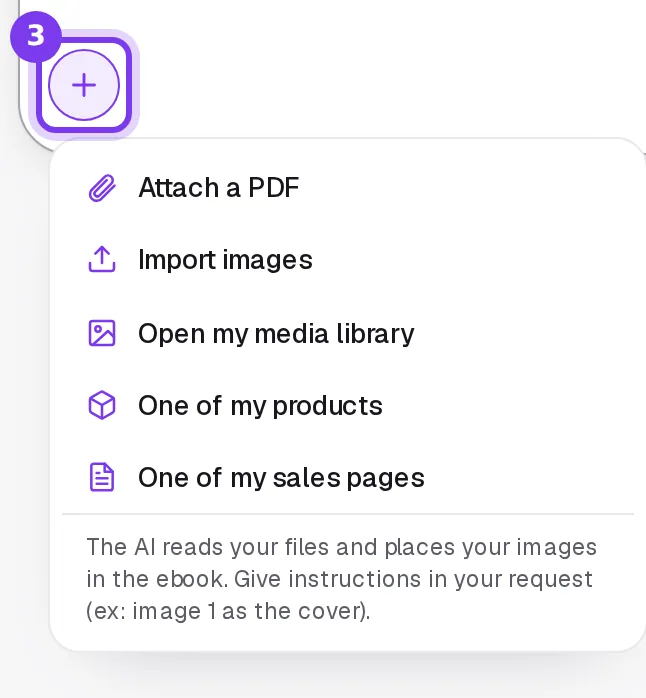
To start from what you know rather than from scratch, the + button lets you attach a PDF of your notes or your own images. The AI uses them to build the outline and places your photos where you ask.
Which tools should you use: one or several?
There are two ways to set this up. The first combines specialized tools: ChatGPT to write, Canva for the layout and the cover, Gumroad or Beacons to sell. The second hands creating and selling to a single tool, such as Shoplit.io. None of the other four tools in the table covers every key step: creating the ebook, writing and publishing the sales page, and taking payment.
| Criterion | Shoplit.io | ChatGPT | Canva | Gumroad | Beacons |
|---|---|---|---|---|---|
| Creates the product with AI (ebook) | Yes | Partly general-purpose documents | Partly AI helps, you design it | Partly AI drafts the listing, not the file | Partly AI drafts the listing, not the file |
| Writes the sales page with AI | Yes | Partly generic site builder, beta | Partly AI text in the page editor | Yes | Yes product page description |
| Sales page builder | Yes | Partly generic site builder, beta | Yes | Yes | Yes |
| Built-in checkout | Yes | Partly via a third-party processor | Partly PayPal payment link | Yes | Yes |
| Free plan | Free + 10% per sale | Free | Free | Free + 10% + $0.50 per sale | Free + 9% per sale |
| First paid plan | €29/month | $8/month | €12/month | None | $10/month + 9% per sale |
- Yes
- Partly
- No
Platform commission, excluding payment processing fees. Prices checked on October 20, 2026 on the official websites. Sources: ChatGPT (1, 2, 3, 4), Canva (1, 2, 3, 4, 5), Gumroad (1, 2, 3), Beacons (1, 2, 3, 4, 5)
ChatGPT is a general-purpose assistant with a free tier that has no time limit, equally at home with an outline, a chapter or a product description. Canva has a drag-and-drop editor and a huge library of templates, photos and illustrations, handy for the visuals that promote your ebook. Before you sell, read what Canva says: for Free and Pro users, any design you want to sell “will need to be created from scratch”, and starting from a designer-made template “is not permitted” (Canva article).
Gumroad is built to sell a file that’s already finished: its marketplace, Discover, can recommend your products to new buyers once you have made your first sales and passed a review, and as the merchant of record it collects and remits VAT and sales tax for you (source). An AI agent can build a custom product page there, but the ebook itself is yours to supply.
Beacons is an all-in-one link-in-bio page for creators, with a store for digital products, courses, emails and a media kit for brand deals. Its AI assistant writes a product’s description and can create the listing from a conversation; the ebook itself is still yours to supply.
The downside of stitching tools together: several accounts, copy-pasting from one tool to the next and payments to sort out. Shoplit.io goes further: from your first sentence to a link you can share, everything happens without switching tools. Its AI assistant writes and illustrates the ebook itself, then, when you ask, its sales page built from the ebook; checkout runs through your own Stripe account and the file reaches the buyer on its own. The Pro plan adds an advanced sales page (sales page, checkout and thank-you page), order bumps and email marketing; the Business plan adds a complete funnel with a one-click offer right after the purchase, plus video courses.
Common mistakes
- Publishing raw AI text. It tends to repeat itself and sometimes gets facts wrong. Amazon, for one, does not allow content that is typically disappointing to customers, according to its Kindle content guidelines.
- Promising results. “Lose 20 pounds”, “double your income”: a promise the ebook can’t guarantee misleads buyers and invites refund requests.
- Reselling a private label rights (PLR) ebook pack as is. The same text is already sold by other people, and nothing sets yours apart.
- Picking a topic that is too broad. “Digital marketing” drowns in the crowd; “landing your first clients on LinkedIn as a freelance designer” fits in one sentence.
- Ignoring the paperwork. Selling regularly without registering as a business, ignoring sales tax or VAT, skipping the withdrawal waiver for EU buyers: these are hard to fix after the fact.
How much does it cost, and how should you price your ebook?
What the tools cost
Creating and selling an ebook can cost nothing to start. What changes from one tool to the next is the limits and the fees.
- ChatGPT: free tier, $8/month for Go (which may include ads) or $20/month for Plus.
- Canva: free tier, or €12/month for Canva Pro billed monthly (the price Canva shows European visitors).
- Gumroad: no subscription, but 10% + $0.50 per direct sale, plus card processing fees, and 30% on sales from its marketplace, processing fees included.
- Shoplit.io: the Free plan lets you create a first ebook, up to 10 pages, and its sales page (2 AI creations), then sell it with a 10% commission per sale. The Pro plan, at €29/month, brings the commission down to 0%, allows ebooks of up to 70 pages and adds your own domain and email marketing, among other things. Stripe’s fees apply to each sale.
How to price your ebook
No single number fits every topic. On Amazon, the top royalty rate requires, among other conditions, a price within a range that Amazon sets; outside it, your share drops sharply (ebook pricing terms). On your own page, you are free: the price depends on what the ebook saves the reader (time, costly mistakes) and on what comparable ebooks cost.
| Ebook type | Example | Where to set the price |
|---|---|---|
| Lead magnet | a checklist, “10 mistakes to avoid with a new puppy” | free, in exchange for an email address |
| Short practical guide | four weeks of lunch menus with shopping lists | entry price, close to comparable ebooks |
| Full guide | a 30-day puppy training method, with a day-by-day schedule and printable worksheets | top of the range for your topic, backed by the tools included |
| Ebook plus bonuses | the full guide, plus fill-in templates or a short video | above the guide alone |
Nothing is set in stone: you can change a price at any time, and your first sales will tell you whether you got it right. In Shoplit.io, the recap suggests a price based on the ebook’s length, and you can change it whenever you like in the product settings.
Frequently asked questions
Is it legal to sell an ebook written with AI?
Yes, as long as you follow the usual rules: don’t mislead buyers about what they get, and don’t copy someone else’s text. The catch is copyright. In its January 2025 report, the US Copyright Office concluded that prompts alone do not make you the author of the output, while your own writing and your creative selection and edits can be protected. In France, a July 2026 report to the Ministry of Culture’s copyright council reaches a similar conclusion. Check the AI tool’s terms of use too, and ask a lawyer about your specific case.
Do you have to disclose that an ebook was written with AI?
On Amazon, yes: Kindle Direct Publishing asks you to tell it about any text, images or translations created by an AI tool, even if you edited them afterwards. If you register a copyright in the US, you must also disclose AI-generated material. In the EU, the AI Act calls for a label on AI-generated text published to inform the public on matters of public interest, unless a person has reviewed its substance or it has gone through editorial control (spell-checking doesn’t count) and someone holds editorial responsibility for it. Elsewhere, it depends on the platform. Either way, never present the ebook as the work of an expert who doesn’t exist.
How much should you charge for an ebook?
Start from the price of comparable ebooks on your topic, then position yours according to what it adds: a complete method, templates, concrete examples. A short ebook can also be given away in exchange for an email address, to build a list of readers. You can change the price at any time, so test.
How long does it take to create an ebook with AI?
Generation takes a few minutes with an ebook generator, a bit longer for a long ebook. The real time goes elsewhere: choosing the topic, editing, fact-checking, adding your examples and preparing the sales page. Allow for at least one full read-through before you start selling.
Do you need to be self-employed to sell ebooks?
It depends on your country. In the US, selling ebooks as a business makes you self-employed (a sole proprietor by default), and the IRS requires a tax return once your net self-employment earnings reach a set threshold; some sellers later form an LLC. In the UK, HMRC asks you to register for Self Assessment once your trading income goes over the trading allowance. Sales tax or VAT rules apply on top. This is general information, not tax advice: check with an accountant or your tax authority.
Where can you sell an ebook made with AI?
Three options: an online bookstore such as Amazon, which brings readers but sets its own rules; a platform with a marketplace such as Gumroad; or your own sales page, where you keep the relationship with the buyer and set your price freely. Shoplit.io belongs to the third group, and it also creates the ebook and its sales page. The Free plan lets you sell a first ebook, with a 10% commission per sale; the Pro plan, at €29/month, brings it down to 0%.
Step-by-step guides in the help center
Read also
- Where to sell ebooks online: platforms, fees and taxesShoplit.io, Gumroad, Payhip, Sellfy or Amazon KDP: where to sell ebooks online, what each one takes per sale and who collects VAT or sales tax.
- AI ebook generators compared: make an ebook you can sellGenspark, Automateed, ChatGPT, Canva and Shoplit.io compared: what each AI ebook generator produces, and which ones also let you sell the ebook.