
Where to sell ebooks online: platforms, fees and taxes
In short
There are three ways to sell ebooks online: your own sales page with a checkout, a selling platform such as Gumroad, Payhip or Sellfy, or an online bookstore such as Amazon KDP, which brings readers but keeps a bigger share. Shoplit.io, our tool, adds the creation step: its AI writes the ebook, then its sales page on request.
Tax depends on where your buyer lives; some platforms collect it for you, otherwise you file it yourself.
Three ways to sell an ebook online
Pick the channel before you compare tools. It decides who brings the buyers and who deals with tax.
- Your own sales page. A page presents the ebook and leads to an online checkout, with Stripe for example. You set the price and get every buyer’s email address, so you can offer them other products later. In return, bringing visitors is your job, through social media or an email list.
- A selling platform. Gumroad, Payhip or Sellfy handle checkout and deliver the ebook. Some add a marketplace where buyers can discover your products, and some handle tax for you.
- An online bookstore. Amazon KDP sells your ebook to its own customers, and other stores, such as Kobo (through Kobo Writing Life), Apple Books or Google Play Books, work on the same principle. You tap into their audience, but the store sets its rules and keeps a share of the price.
| Your sales page | Selling platform | Online bookstore | |
|---|---|---|---|
| Who brings buyers | you | you, sometimes helped by a marketplace | the store, on top of your own audience |
| Who sets the price | you | you | you, within the store’s limits |
| Who is the official seller | you | you, or the platform if it is a merchant of record | the store |
| Who collects the tax | you | you or the platform, depending on the tool | the store |
| What the buyer gets | your file, as is | the file you upload | an ebook in the e-reader or app format |
Where to sell your ebook: platforms compared
Shoplit.io, our product, belongs to the first group, with one extra step: it also creates the product. Its AI assistant writes, illustrates and lays out the ebook from one sentence, then writes its sales page if you ask for it in the same message.
| Criterion | Shoplit.io | Gumroad | Payhip | Sellfy | Amazon KDP |
|---|---|---|---|---|---|
| Creates the product with AI (ebook) | Yes | Partly AI drafts the listing, not the file | No | No | No |
| Writes the sales page with AI | Yes | Yes | No | No | Partly AI page modules, US only |
| Sales page builder | Yes | Yes | Yes | Yes | Partly enriched Amazon product page |
| Built-in checkout | Yes | Yes | Yes | Yes | Yes |
| Email marketing | Yes Pro, Business | Yes | Yes | Yes | No |
| Free plan | Free + 10% per sale | Free + 10% + $0.50 per sale | Free + 5% per sale | No | Free + 30% per sale |
| First paid plan | €29/month | None | $29/month + 2% per sale | $29/month | None |
- Yes
- Partly
- No
Platform commission, excluding payment processing fees. Prices checked on October 20, 2026 on the official websites. Sources: Gumroad (1, 2, 3, 4), Payhip (1, 2, 3, 4), Sellfy (1, 2, 3, 4), Amazon KDP (1, 2, 3, 4)
Gumroad, Payhip and Amazon can show your ebook to buyers who have never heard of you. Gumroad’s Discover marketplace first requires real sales and a review (Discover requirements); Payhip lets you list your products on its marketplace for free, after a review (changelog).
On Amazon, the sales page is Amazon’s product page, which you can enrich with text and images. On the platforms, you build your product page yourself; Gumroad also offers an AI agent that writes it for you. On Shoplit.io, it draws on the content and colors of the ebook the AI wrote: you go from idea to product on sale without copying and pasting from one tool to another.
On tax, Gumroad, Amazon KDP and, to a large extent, Payhip collect and remit it for you (details below). For more on these tools, read our Gumroad alternatives and Shoplit.io vs Payhip comparisons.
Fees and commissions: what you keep from each sale
Up to three deductions stack up on every sale: tax (if you owe it or the platform collects it), the tool’s commission and the payment processor’s fees.
- Shoplit.io: the Free plan lets you create and sell a first ebook with its sales page, with a 10% commission per sale; the Pro plan, at €29/month, brings the commission down to 0% and adds your own domain and email marketing. Stripe fees come on top.
- Gumroad: no subscription. It takes 10% + $0.50 per direct sale, plus card or PayPal processing fees, and 30% on a sale from its marketplace, processing included (Gumroad pricing).
- Payhip: a free plan with a 5% commission, 2% on the Plus plan at $29/month, and no commission on the Pro plan at $99/month. PayPal or Stripe fees come on top.
- Sellfy: no free plan, only a 14-day trial with checkout turned off. After that, a subscription from $29/month with no commitment and no commission. Each plan covers a set amount of yearly sales, past which Sellfy expects you to upgrade, and PayPal or Stripe fees come on top (Sellfy pricing).
- Amazon KDP: publishing is free. With the better royalty option, Amazon keeps 30% of the price excluding VAT, as long as the price stays within the band Amazon sets and the buyer is in an eligible territory (the US and the UK are on the list). Delivery costs, based on file size, also come out of your share. Otherwise, Amazon keeps 65% (Kindle royalties).
A zero-rated ebook sold for £15 to a UK buyer carries no VAT, so the full £15 is yours before fees. Sell a €15 ebook to a buyer in France and, at France’s 5.5% rate for digital books, €0.78 of it is VAT, leaving €14.22 before commission and payment fees.
Sales tax and VAT on ebooks: who collects it?
EU VAT
In the EU, ebooks sold to consumers count as electronically supplied services, taxed at the VAT rate of the buyer’s country. EU rules let member states apply reduced rates to e-publications, so rates vary: France, for example, charges 5.5% on digital books that meet its legal definition of a book, and the standard 20% on content that doesn’t, such as mostly fill-in workbooks or video courses (French tax guidance, BOFiP).
A seller established in a single EU country can apply its home VAT to cross-border sales to consumers until they pass €10,000 a year, counting the current and the previous calendar year. Above that threshold, or if you are based outside the EU, VAT is due in each buyer’s country. The One Stop Shop lets you declare it in one place, with a non-Union scheme for sellers based outside the EU (European Commission).
UK VAT
Digital services sold to UK consumers are liable to UK VAT, and HMRC lists e-books among them (HMRC). Since May 1, 2020, electronic books have been zero-rated, unless more than half of the publication is advertising, audio or video, or it is mainly meant to be filled in; audiobooks stay at the standard rate (HMRC). When you sell to UK consumers through a third-party platform or marketplace, HMRC says the platform accounts for the VAT instead of you.
US sales tax
Since South Dakota v. Wayfair in 2018, states can require sellers with no physical presence to collect sales tax once they pass the state’s economic threshold (Streamlined Sales Tax). Thresholds, and whether digital products are taxed at all, vary by state. Washington, for example, applies sales or use tax to all digital products, however they are accessed, subject to listed exclusions (Washington Department of Revenue). Check the rules in each state where your buyers live, or use a tool that collects the tax for you.
Who collects it, depending on the tool
Gumroad is the merchant of record: it collects and remits sales tax and VAT on all sales, worldwide (source). Amazon collects VAT on its sales and calculates your royalty on the price excluding VAT. For EU and UK VAT on digital products, Payhip says it acts as your reseller and takes full responsibility (Payhip VAT page); since July 1, 2026, it also collects US sales tax (source). Sellfy calculates EU VAT, but remitting it is up to you (source).
With Shoplit.io, the money goes to your own Stripe account and you file any VAT or sales tax you owe yourself. Whichever tool you use, you still report your income.
Do you need a business to sell ebooks?
Selling ebooks regularly usually counts as a business for tax purposes. What that means depends on where you live.
- In the US, the IRS generally treats you as self-employed if you carry on a trade as a sole proprietor, which is what you are unless you set up another structure. Self-employed people generally file an annual tax return, pay estimated taxes quarterly and owe self-employment tax on top of income tax. Some sellers later form an LLC, a structure allowed by state law; your form of business decides which return you file (IRS).
- In the UK, if your gross trading income is £1,000 a year or less, the trading allowance means you may not need to tell HMRC. Above that, you will generally need to register for Self Assessment and report it on a tax return (HMRC).
Wherever you live, ebook income is taxable. Asked whether you have to pay taxes on KDP sales, Amazon replies: “The short answer: yes” (KDP help). This is general information, not tax advice: ask an accountant for your own situation.
How to choose in 4 steps
- Start from your audience. If nobody follows you yet, an online bookstore or a marketplace can bring your first readers. If you already have an audience on TikTok, Instagram or an email list, your own sales page lets you set your own rules and keep in touch with every buyer.
- Decide who handles tax. If you don’t want to deal with it, pick a merchant of record or a platform that remits tax for you. If you handle it yourself, list where your buyers live: EU VAT, UK VAT and US state sales tax each have their own rules and thresholds.
- Run the numbers at your target price. For your ebook, start from the price the buyer pays, then take off tax, the commission and payment fees. On a low price, a fixed per-sale fee bites harder than it looks, while a monthly subscription only pays off past a certain number of sales.
- Prepare the sale. Publish your terms of sale and privacy policy. For EU consumers, the 14-day right of withdrawal (Your Europe) only falls away for digital content if three conditions are met (EU Directive 2011/83, Article 16(m)). You need the buyer’s prior express consent to immediate delivery, their acknowledgement that they lose the right, and your confirmation on a durable medium, such as the delivery email. Finally, make a test purchase to check that the file arrives.
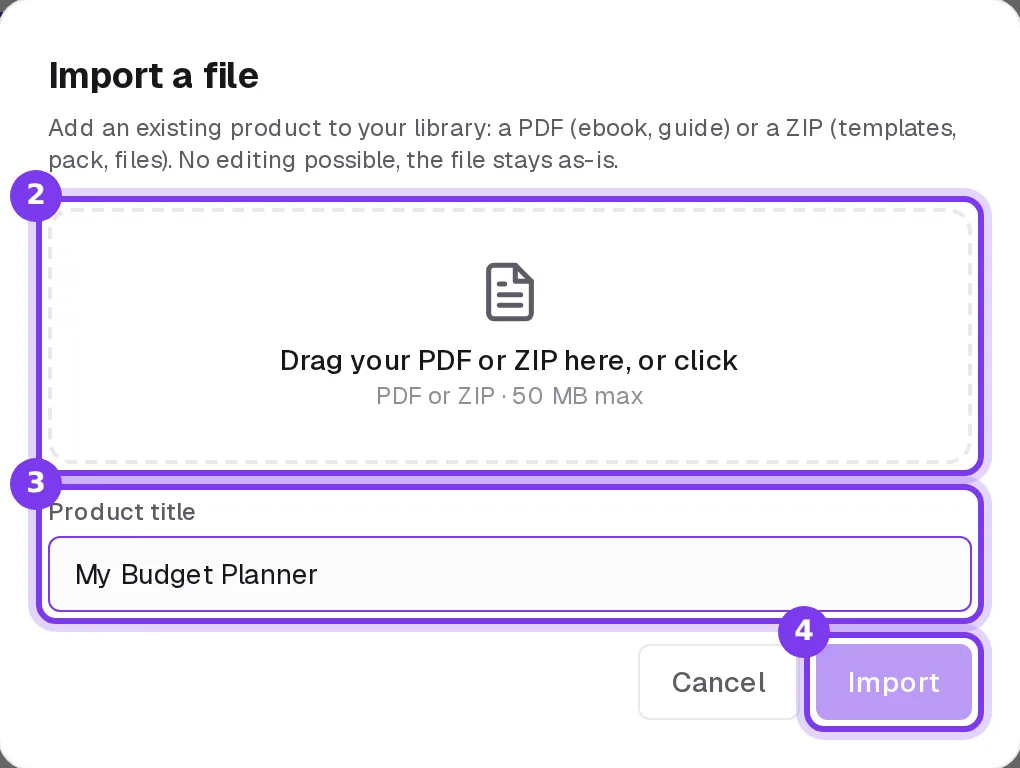
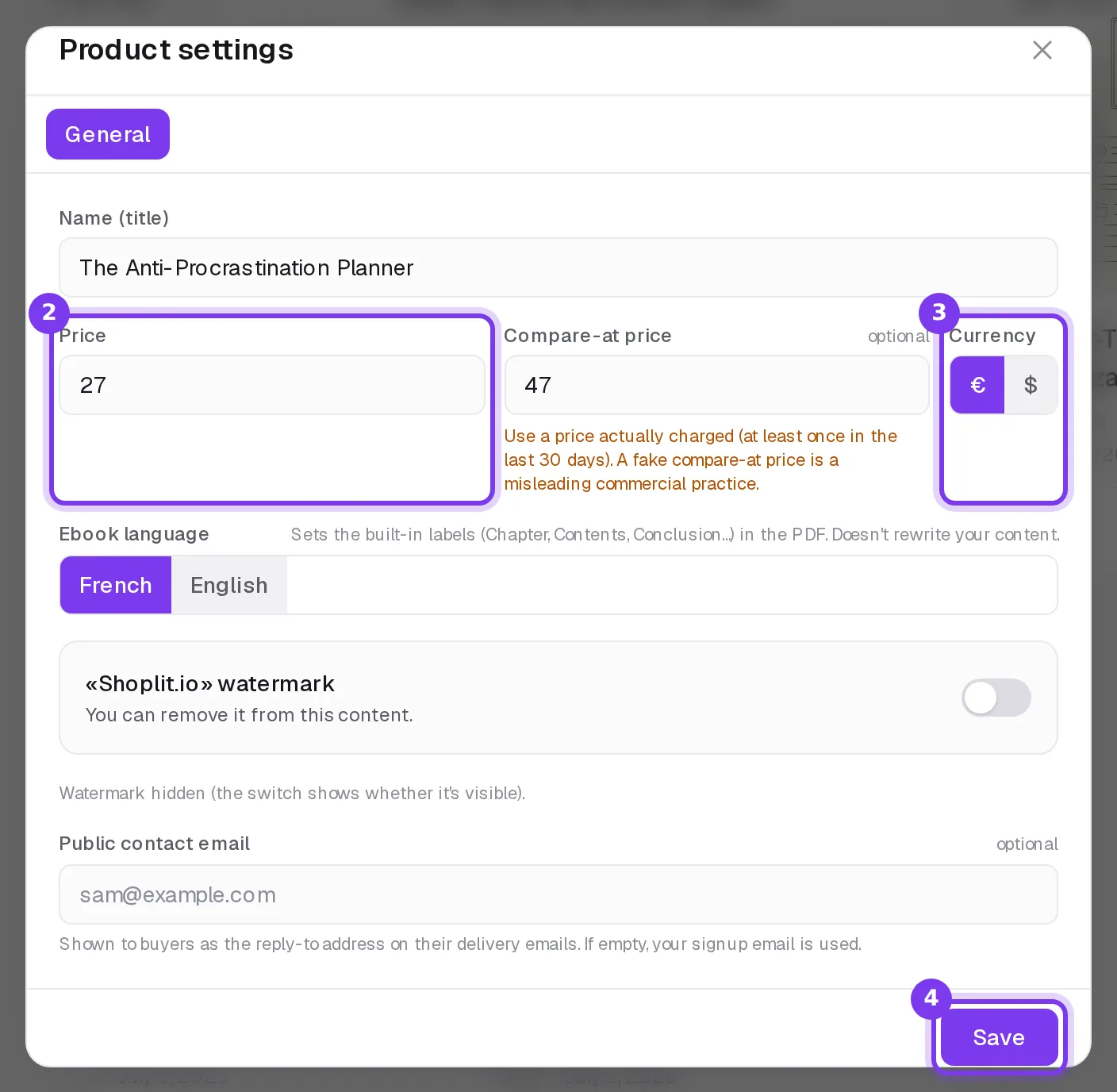
In Shoplit.io, you start from an ebook that AI writes for you (the step-by-step method) or upload a PDF or ZIP you already have, up to 50 MB. You then set its price and currency in its settings, create its sales page and turn on Stripe payments: the buyer receives their download link after the purchase. The checkbox for waiving the right of withdrawal is in Settings, under Legal pages: the buyer ticks it before paying. Then send your confirmation on a durable medium, for example by email after the purchase.
Once your ebook is on sale, Shoplit.io grows with you: email marketing from the Pro plan, funnels with one-click upsells and video courses on the Business plan.
Frequently asked questions
Do you need to register a business to sell ebooks?
If you sell regularly, you are running a business, and the rules depend on your country. In the US, the IRS generally treats you as self-employed, a sole proprietor unless you set up another structure such as an LLC, and you file an annual return. In the UK, HMRC asks you to register for Self Assessment once your trading income goes over the trading allowance. In France, selling ebooks you wrote is usually declared as artist-author income with Urssaf. This is general information, not tax advice: check with an accountant or your tax authority.
Is there VAT or sales tax on ebooks?
Usually, yes. In the EU, ebooks sold to consumers are taxed at the VAT rate of the buyer’s country (a seller based in one EU country applies its home rate while its cross-border sales stay under the EU’s yearly threshold), and many countries apply a reduced rate: France charges 5.5% on digital books that meet its legal definition of a book, and 20% on other digital content. In the UK, most ebooks have been zero-rated since May 1, 2020. In the US, it depends on the state. Some platforms collect and remit the tax for you; others leave it to you.
Can you sell an ebook on Amazon without an ISBN?
Yes. On Kindle Direct Publishing, an ISBN is optional for ebooks, as it is for low-content books. You need one for a paperback or hardcover; Amazon then offers a free ISBN that can only be used on KDP. Shoplit.io doesn’t ask for an ISBN either: to upload your ebook, you only need a PDF or ZIP file and a title.
How do you deliver the ebook file automatically?
Use a tool that links payment and delivery: a selling platform or a sales page with built-in checkout. Once the buyer pays, they get a download link by email without you doing anything. In Shoplit.io, you upload your PDF or ZIP, set its price, create its sales page and turn on Stripe payments: the buyer then receives their link as soon as they pay. Avoid sending files by hand: it delays delivery and means watching every sale.
Should your ebook price include VAT or sales tax?
If you sell to consumers in Europe, the price they see usually includes VAT: your share starts from the price excluding VAT, and the tool’s commission and payment fees then come out of it. In the US, prices are usually shown before sales tax, which is added at checkout when the buyer’s state taxes ebooks. On Amazon, KDP calculates your royalty on the price excluding VAT.
Step-by-step guides in the help center
Read also
- How to create an ebook with AI and sell it, step by stepHow to create an ebook with AI and sell it: 8 steps from idea to checkout, the tools to combine, and the rules to know (copyright, Amazon KDP, AI disclosure).
- Gumroad alternatives: Payhip, Sellfy, Systeme.io comparedShoplit.io, Payhip, Sellfy or Systeme.io: fees, sales tax, AI and sales pages compared, plus how to leave Gumroad without losing your customers.