
Sales page builders compared: which one to choose?
In short
A sales page needs a tool that builds the page and takes payment. Shoplit.io’s AI writes your ebook, then its sales page on request, with Stripe checkout from the Free plan, which takes a commission per sale. Systeme.io has a free plan with pages and checkout; ClickFunnels and Leadpages are paid and focus on funnels or A/B testing; Gumroad also charges per sale, with no subscription. A good page follows this order: promise, contents, proof, price, guarantee, buy button.
Sales page vs landing page: what’s the difference?
A sales page presents one offer and has one job: get the visitor to buy. It says who the product is for, what’s inside and what it costs, then leads to checkout. “Landing page” is the broader term: any page built for a single action. When that action is a purchase, it’s a sales page; when it’s an email address left in exchange for a freebie, it’s an opt-in page.
Don’t confuse it with a sales funnel, which adds steps before and after the page, covered in our guide on how to build a sales funnel.
What a sales page should include
These blocks follow the buyer’s questions, from “is this for me?” to “how do I pay?”. Example: a meal prep ebook for busy parents.
- The promise. A headline that says who the product is for and what it gets them: “A week of dinners, prepped in two hours on Sunday.” No results you can’t guarantee, like pounds lost or dollars saved.
- The problem. Two or three sentences that describe the reader’s situation in their own words: the 6 p.m. “what’s for dinner?”, the random grocery runs.
- The solution. What the product offers, and why the method works: one cooking session, recipes that keep well.
- The contents. Exactly what the buyer gets: number of recipes, chapters, format (a downloadable PDF), bonuses. A preview of a few pages reassures more than a long description.
- The proof. Real reader reviews, your own results, your background in two lines. If you’re just starting, a free excerpt beats a made-up testimonial, which is illegal (see the last section).
- The price. Shown clearly, with what it includes and whether tax is included. Don’t keep it hidden until checkout.
- The guarantee. What happens if the product isn’t a fit. Only promise what you’ll actually honor.
- The FAQ. The questions that stop people from buying: “How do I get the file?”, “Can I print it?”.
- The call to action. A visible button, repeated after the key blocks, with a clear verb (“Get the ebook”). Every button leads to checkout.
Sales page builders compared
Systeme.io, ClickFunnels and Leadpages are among the tools most often named in guides on the topic; Gumroad represents selling platforms that give each product its own page.
| Criterion | Shoplit.io | Systeme.io | ClickFunnels | Leadpages | Gumroad |
|---|---|---|---|---|---|
| Sales page builder | Yes | Yes | Yes | Yes | Yes |
| Writes the sales page with AI | Yes | Partly AI Chat on Unlimited plan, or prompt for an external AI | Yes | Yes | Yes |
| Built-in checkout | Yes | Yes | Yes | Yes | Yes |
| Custom domain | Yes Pro, Business | Yes | Yes | Yes | Yes |
| Free plan | Free + 10% per sale | Free | No | No | Free + 10% + $0.50 per sale |
| First paid plan | €29/month | €17/month | $97/month | $29/month | None |
- Yes
- Partly
- No
Platform commission, excluding payment processing fees. Prices checked on October 20, 2026 on the official websites. Sources: Systeme.io (1, 2, 3), ClickFunnels (1, 2, 3, 4), Leadpages (1, 2, 3), Gumroad (1, 2, 3)
Systeme.io’s free plan takes no commission. With no time limit and no card required, it includes 3 funnels, drag-and-drop pages, Stripe or PayPal checkout, a custom domain and email sending. Its terms cap it at $10,000 in lifetime revenue. Its built-in AI Chat creates pages and writes their content, but for now only on the Unlimited plan, at €97/month; on other plans, Systeme.io gives you a prompt to paste into an outside AI. Its site and help center are available in English and French. See also our Systeme.io alternatives.
ClickFunnels builds complete funnels around the page: one-click upsells, order bumps, A/B tests, several payment gateways. Its “Build with AI” assistant designs pages and writes the copy from a conversation (help center). No free plan, a 14-day trial; the first plan costs $97/month. For the full head-to-head, see Shoplit.io vs ClickFunnels.
Leadpages specializes in landing pages and conversion: unlimited traffic, A/B testing and heatmaps depending on the plan. Its AI builder turns a short brief into a complete page in about a minute, and Stripe checkout sits right inside the page. No free plan, a 7-day trial; the first plan costs $29/month on its official US dollar price list, and European visitors see euro prices, higher on the upper plans.
Gumroad has no subscription: it takes 10% + $0.50 per direct sale, plus card processing fees. Every product gets a page, which an AI agent can replace with a custom one. Gumroad also has a marketplace, Discover, which can recommend your products to new buyers, and merchant of record status, which handles sales tax and VAT for you (Gumroad help). Other platforms of this kind are compared in our Gumroad alternatives.
Shoplit.io, our own tool, starts with the product. Its AI writes the ebook, then its classic sales page if you ask for it in the same message, starting on the Free plan: the page is written from the ebook, in its colors, and the money goes to your own Stripe account. The Pro plan then adds an advanced sales page (sales page, checkout, thank-you page), order bumps and your own domain; the Business plan adds a complete funnel with a one-click offer right after the purchase.
The other tools each fit a specific need: Systeme.io to combine pages, funnels and emails on a free plan, ClickFunnels for advanced funnels, Leadpages for landing pages you want to test, Gumroad for a finished file and its marketplace.
Free or paid: what free plans leave out
A sales page can cost nothing to start. What changes is the trade-off: fewer pages, no domain of your own, a cut of each sale or a revenue cap. And your payment processor (Stripe, PayPal) always takes its own fees.
On Shoplit.io, the Free plan lets you create an ebook and its classic sales page (2 AI creations), with a 10% commission per sale, and up to 3 funnels you build yourself in the block editor. The Pro plan, at €29/month, brings the commission down to 0%.
Without a dedicated tool, a page made with a free website builder plus a Stripe or PayPal payment link costs little. File delivery, legal pages and the withdrawal waiver for EU buyers are then up to you.
Do you need your own domain name?
No rule we found requires one for a sales page: a page published on your tool’s address, such as yourname.tool.com, can sell. With your own domain, the link stays the same if you switch tools. On Shoplit.io’s Pro plan, you connect your own domain to your storefront and your sales pages.
How to create a sales page in 6 steps
- Sum up the offer in one sentence: who it’s for, what result, in what format (“a printable study planner for students during exam season”). It will become your headline.
- Pick the tool based on where you start: a file that’s ready to sell, a full funnel with emails, or an ebook to create from scratch. Before signing up, check that checkout is built in and what each sale costs, processor fees included.
- Write the copy in the order of the blocks above. AI writes a fast first draft if you give it the reader, the promise and the exact contents. Then read every sentence: cut what the product doesn’t deliver, add your own examples.
- Build the page from a template, with your colors and two fonts at most. Check the mobile version first: a visitor coming from TikTok or Instagram reads your page on a phone.
- Connect checkout and automatic file delivery, add your legal pages and, if you sell a digital product to EU buyers with instant delivery, the withdrawal waiver checkbox.
- Run a test purchase in your payment processor’s test mode, open the delivery email, then share the link in your bio, posts and emails.
In Shoplit.io, you ask the AI assistant for the sales page in the same message as the ebook: “a meal prep ebook for busy parents, and a classic sales page to sell it”. The AI asks a few questions, shows a recap, then generates the ebook and its page in matching colors; on the Pro plan, the recap offers an advanced page, with checkout and thank-you page. When you create a classic page, you paste your real reviews, start from examples (marked “Example reviews” in the editor, to replace before sharing; also check the star rating above the price) or start without any. The page is live as soon as it’s created, at an address like yourname.shoplit.io/your-page.

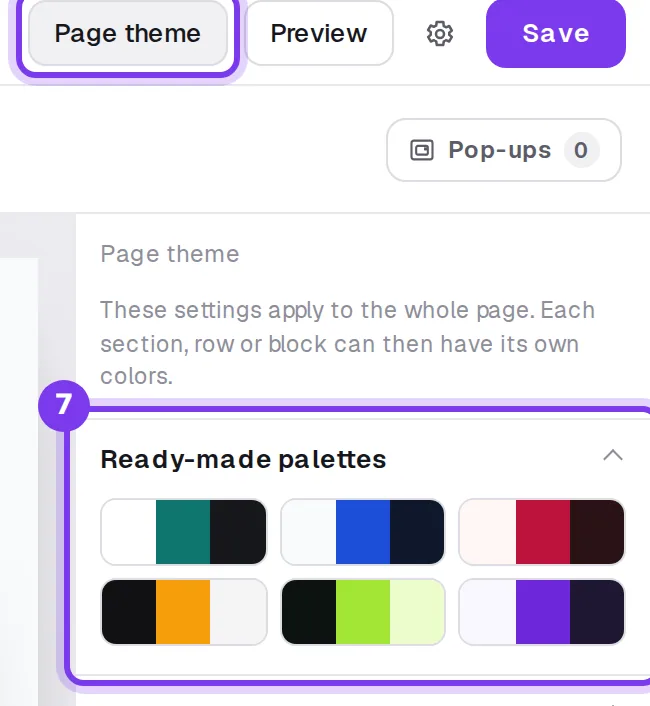
In a funnel (an advanced page or a funnel you built from scratch), the Edit button opens the block editor: you add blocks (image, video, customer reviews, FAQ, guarantee), change any text by clicking it and check the mobile view. The Page theme button applies a palette, your fonts and button rounding to the whole page.
What the law requires on a sales page
Rules depend on where you and your buyers are, and none of these tools handles all of them for you. These are pointers from official sources, not legal advice.
- Who you are. Show who is selling and how to reach you, and link your terms of sale, refund policy and privacy policy from the page. The exact list depends on your country: in the UK, you must give buyers your business name, contact details and address before they order (GOV.UK); in the EU, your identity and your physical and email addresses (Your Europe).
- The full price. In the EU, buyers must be told the total price, including all taxes and additional charges, before they buy (Your Europe). In the US, where sales tax is usually added at checkout, say so on the page.
- The EU right of withdrawal. Buyers in the EU can usually cancel an online purchase within 14 days. For digital content such as an ebook, that right ends once the download starts only if the buyer expressly agreed to lose it (Your Europe): hence the checkbox at checkout. It is not enough on its own: the seller must also confirm that agreement to the buyer on a durable medium, such as the delivery email (EU Directive 2011/83, Article 16). UK rules are similar (GOV.UK).
- The online withdrawal function. In the EU, since June 19, 2026, sellers who sign contracts online must also offer a way to withdraw directly online (EU Directive 2023/2673; for France, Service-Public, in French), easy to reach for the whole withdrawal period. How it fits with the waiver for digital content isn’t spelled out: build it into your pages (for example, a clearly visible link to your withdrawal form), and check with your local consumer authority or a lawyer if in doubt.
- Reviews and urgency. In the US, the FTC’s final rule announced in August 2024 bans fake reviews and testimonials, including AI-generated ones and those from people who never used the product, and lets the agency seek civil penalties against knowing violators (FTC). EU rules in force since May 2022 also treat fake reviews as an unfair practice (EU Directive 2019/2161; for France, Service-Public, in French). An AI that writes your page may add sample reviews and a sample star rating: replace or delete them before you publish. Leave out countdown timers that reset and made-up “only 3 left” stock too: they mislead buyers, and EU law bans falsely claiming that an offer is only available for a very limited time (Unfair Commercial Practices Directive 2005/29, Annex I, point 7).
In Shoplit.io, your legal pages (legal notice, terms of sale, refund policy, privacy policy) go in Settings, Legal pages tab, and their links show at the bottom of your sales, checkout and thank-you pages. The withdrawal waiver checkbox is in the same tab. Write these texts for your own situation, then send each buyer a confirmation of their waiver on a durable medium, such as an email after the purchase.
Frequently asked questions
Can I create a sales page for free?
Yes. On Shoplit.io, the Free plan uses AI to write the ebook and its classic sales page, then takes payment through Stripe, with a 10% commission per sale; the Pro plan, at €29/month, adds your own domain. Systeme.io has a free plan with no time limit that includes sales pages, Stripe or PayPal checkout and a custom domain, capped at $10,000 in lifetime revenue. Gumroad has no subscription and takes 10% + $0.50 per direct sale. ClickFunnels and Leadpages only offer a free trial. Your payment processor’s fees always come on top.
Do I need a domain name for a sales page?
No rule we found requires one: a page published on your tool’s address, such as yourname.tool.com, can sell. Your own domain still helps: the link stays the same if you switch tools. Whatever the address, buyers should be able to see who is selling and how to reach you.
Can AI write my sales page?
Yes, as a first draft. Shoplit.io writes the page from the ebook it created itself, when you ask for it in the same message, on every plan. ClickFunnels, Leadpages and Gumroad have AI that writes or builds the page; Systeme.io keeps its built-in AI Chat for the Unlimited plan for now and offers a prompt to paste into an outside AI on other plans. Always review the draft: cut promises the product can’t keep, check the numbers and replace sample reviews with real ones. In the US, the FTC bans fake reviews and testimonials, including AI-generated ones.
What is the difference between a sales page and a landing page?
A landing page is built for a single action: leave an email, sign up, buy. A sales page is the landing page whose action is a purchase: it presents the offer in detail, shows the price and leads to checkout. An opt-in page only asks for an email, often in exchange for a freebie.
How long does it take to create a sales page?
With AI, a first draft takes a few minutes; with a template, you can build the page in a day. The real work is elsewhere: knowing who you are talking to, gathering real proof (reviews, excerpts, screenshots), checking every promise, filling in your legal pages and testing the purchase on a phone. Publish a clean first version, then improve it with your first visitors’ questions.
Step-by-step guides in the help center
Read also
- How to build a sales funnel in 7 steps, with an exampleHow to build a sales funnel in 7 steps: opt-in page, sales page, order bump, upsell, emails, consent rules, the tools compared and a full example.
- ClickFunnels vs Shoplit.io: pricing, free plan and AIClickFunnels pricing, free trial, one-click upsells and AI compared with Shoplit.io, which writes your ebook and its sales page, from a free plan.